This holiday season, print your own calendars and send them via snail-mail to all your friends and family as new year gifts. They'll love the concept and remember you all the year round.
And creating an attractive holiday calendar at home is as simple a job as boiling eggs - all you need is a printer (colored or b/w), digital photographs (optional) and some time.
You can skip the difficult part that involves designing the calendar since Canon and Microsoft provide tons of 2007 calendar templates for free that you can simply download from web, customize with pictures or taglines and hit the Print button.


Canon Creative Park has a huge collection of free Calendar Templates in either PNG or PDF formats. You can embed your own pictures in the calendars by opening the template in any image editor or even Microsoft Word.
Other than the regular wall calendars and photoframes, Canon website has some more appealing designs like the Vertical look or the 3D horizontal style as shown in the picture above. There are simple step-by-step instructions on how to fold and glue the calendar or assembling the calendar stand.
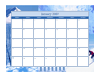


Microsoft Office Online also has an extensive collection of 2007 Calendar Templates especially for users of Microsoft Word, Powerpoint or Excel. The templates directly open inside the Office programs like any other document and can be further customized with your logo, pictures or color schemse.
The final price of your Calendar 2007 ? Other than paper and printing ink, there's actually no other cost involved.
Further Reading:
Save and Print Google Calendar as PDF with Acrobat
Add National Holidays to your Calendar
Save Trees and Money - Ways to Reduce Printing Cost
And creating an attractive holiday calendar at home is as simple a job as boiling eggs - all you need is a printer (colored or b/w), digital photographs (optional) and some time.
You can skip the difficult part that involves designing the calendar since Canon and Microsoft provide tons of 2007 calendar templates for free that you can simply download from web, customize with pictures or taglines and hit the Print button.


Canon Creative Park has a huge collection of free Calendar Templates in either PNG or PDF formats. You can embed your own pictures in the calendars by opening the template in any image editor or even Microsoft Word.
Other than the regular wall calendars and photoframes, Canon website has some more appealing designs like the Vertical look or the 3D horizontal style as shown in the picture above. There are simple step-by-step instructions on how to fold and glue the calendar or assembling the calendar stand.



Microsoft Office Online also has an extensive collection of 2007 Calendar Templates especially for users of Microsoft Word, Powerpoint or Excel. The templates directly open inside the Office programs like any other document and can be further customized with your logo, pictures or color schemse.
The final price of your Calendar 2007 ? Other than paper and printing ink, there's actually no other cost involved.
Further Reading:
Save and Print Google Calendar as PDF with Acrobat
Add National Holidays to your Calendar
Save Trees and Money - Ways to Reduce Printing Cost