Outlook 2007 Slow ? - Download the latest Outlook 2007 patch from Microsoft Download center (KB933493)and you may notice a modest improvement in Outlook performance.
Outlook 2007 is not just slow, it can sometimes be very unpredictable. Look at these error messages that popped up while using the software:
Outlook 2007 Blocks Websites that it "thinks" are dangerous
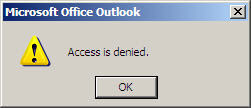
Someone sent me a link to a webpage hosted on blogspot.com. For some reason Outlook 2007 thought the destination URL contained in the email message may be unsafe and showed a warning box when I tried visiting the website.

Outlook 2007 Recognizes an Official Addin as Dangerous
While reading emails inside Outlook 2007, suddenly a security notice pops-up saying "Microsoft Office Outlook has identified a potential security concern. The application addin outlvba.dll has been disabled. Addins might contain viruses and other security hazards."
Now this is extremely funny because the add-in which seems to pose a threat is actually an official Microsoft VBA for Outlook Addin. See the publisher details in the screenshot.


Outlook 2007 is not just slow, it can sometimes be very unpredictable. Look at these error messages that popped up while using the software:
Outlook 2007 Blocks Websites that it "thinks" are dangerous
Someone sent me a link to a webpage hosted on blogspot.com. For some reason Outlook 2007 thought the destination URL contained in the email message may be unsafe and showed a warning box when I tried visiting the website.
Hyperlinks can be harmful to your computer and data. Click hyperlinks from trusted sources. Do you want to continue ?Now even if you click "Yes", Outlook won't let you open that untrusted webpage and shows another message saying "Access Denied". You have to manually copy-paste the URL in the browser to access that webpage.


Outlook 2007 Recognizes an Official Addin as Dangerous
While reading emails inside Outlook 2007, suddenly a security notice pops-up saying "Microsoft Office Outlook has identified a potential security concern. The application addin outlvba.dll has been disabled. Addins might contain viruses and other security hazards."
Now this is extremely funny because the add-in which seems to pose a threat is actually an official Microsoft VBA for Outlook Addin. See the publisher details in the screenshot.

