Say Goodbye to Windows Start Menu, Launchy 1.0 Is Out Now

Launchy, the Start Menu for Geeks, has just left the beta school and is looking much better and cooler.
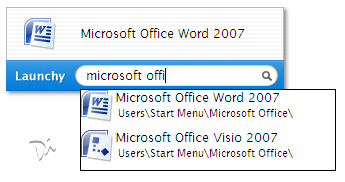
Launchy, a free Windows utility, is more like your Windows Start Menu on steroids - Press the Alt+Space button and start typing the first few character of the program that you want to run - Launchy will guess which program or file you are looking for and will launch it when you hit the enter key.
You can also use Launch to access the icons lying on the desktop, documents, pictures or any file folder on the computer. The concept is similar to Mac Quicksilver or the Google Desktop Search Quick Find bar.
Browse your files/folders: Type in c: and then hit tab, now type in a couple letters of the next directory, and hit tab. (just like command like completion in MS-DOS)
Search the Web: Type google followed by tab and the search terms - Launchy will open the Google results page for you. Also works with MSN, Wikipedia, Yahoo, etc.
If you are more comfortable using the keyboard than the mouse, this is a must-have utility for you.
Launchy Homepage | Download Launchy [thanks neowin]
Related: Get the Windows Vista Style Menu for XP

Download Free Google Software:
Reader Comments:
hi amit. I sometimes wonder why you refer yourself as "we" in your blog posts...especially stuff like "we at Digital Inspiration" and many others that Ive noticed. Is it because you have a team of blog writers under you?
What a incedible new feature. I use something very similar with my ubuntu. But I can easily find my contacts as well.
I wonder if Windows user switch from their mouse to keyboard to type -Alt- -Space-, the program name to switch back to the mouse again to handle the shini gui.
Great find. I love this app. Thanks.
I think amit refers to "We" in many of his blog posts to put his thoughts in professional manner.
It is better at times to use "we" to sound more professional rather than use "I", which would be too personal. However, I would have to agree with the fact that a blog is suppose to represent the author's feelings toward a topic of interest.
I could be completely wrong and Amit could have a whole blogging company behind him :)
This is a copy of QuickSilver in Mac.
This reminds me of a Widget I wrote for the Yahoo! Widget Engine some time ago. It's definitely an efficient way to 'start things', and it's nice to see that some one has taken the idea to a new level.
Google Desktop does it too. It indexes your HD. Hit the CTRL key twice shows the Google box that can easily launch indexed docs and programs.
So finally, there is a Windows equivalent for Alt+F2 on Linux :)
I'm not a big fan of these concepts. I particularly don't like the concept of indexing as it takes most of the processing power and at times memory as well. Since there is an alternate way, the traditional way, to launch the programs why should I loose my machine's processing power and the great scarce memory.
I do have a GIG of RAM but I'm always left with 5% to 8% of available memory, yes I do run quite a bit of stuffs at a time on my machine. And running these indexing on par would definitely hog my system and because of this reason I uninstalled it right away.
If resource hog is a not an issue with you then may be this could be a good tool.
More advanced than Launchy is FARR:
http://www.donationcoder.com/Software/Mouser/findrun/index.html
Advantages are advanced ordering heuristics, and a much more expandable command structure. Note it does not index, it searches in real-time. Disadvantages are it looks less pretty...
Oh, and Quicksilver is waaaay more advanced than anything on windows...
Swaroop - Thanks for sharing the Alt+F2 shortcut for Linux. That was new for me.
my friend, Vista UI is lot like MAC - click here for details
/Yuva
No! The Windows equivalent of Linux Alt + F2 is Windows key + R.
Alt + F2 in Linux launches Run just as Windows Key + R does in Windows.
Have a question? Need help? Visit the forums ».