The moment you see a logo with bright colors, rounded corners, funky words and reflecting text (like Apple's Acqua effect), you know that it's got something to do with Web 2.0.
Well, you don't need to hire any creative designers for making those web 2.0 style logos for your blog - just follow any of these tutorials. And if you hate reading instructions in text, head straight to the video tutorial.
Web 2.0 Logo in Photoshop - This video only tutorial [no audio] uses the power of Adobe Photoshop CS to create Web 2.0-Style Logo that's glossed, has a gradient, slight reflection and a beta sign. The results are similar to above 1-click log creator though you have more control over text sizes, fonts and colors. Techniques should apply to GIMP as well.
Photoshop Lab Design Kit - The most detailed instruction set for creating logos with Web 2.0 effects. You can either create a standalone logo or a complete header graphic for your site in Web 2.0 style. Part II illustrates how to create diagonal line patterns, rounded corners and some other Web 2.0 effects.

Web 2.0 Logo Creator - The simplest of all logo Creators that generates Digg logo clones in seconds - just type in a text and if it's a name of some ground-breaking product that you are working on, put the perpetual beta sticker that's now a part of almost every Web 2.0 tool.
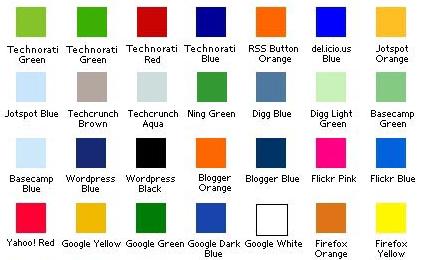
If you need some color inspiration, Miles Burke has capture the color schemes of most popular Web 2.0 properties like Flickr, LinkedIn, Techcrunch, etc and pasted them on one web 2.0 color scheme file. Download here
Previous Stories on Logos:
Create Logos with Adobe Fonts for Free
Important Guidelines before Using Trademarks & Logos
Well, you don't need to hire any creative designers for making those web 2.0 style logos for your blog - just follow any of these tutorials. And if you hate reading instructions in text, head straight to the video tutorial.
Web 2.0 Logo in Photoshop - This video only tutorial [no audio] uses the power of Adobe Photoshop CS to create Web 2.0-Style Logo that's glossed, has a gradient, slight reflection and a beta sign. The results are similar to above 1-click log creator though you have more control over text sizes, fonts and colors. Techniques should apply to GIMP as well.
Photoshop Lab Design Kit - The most detailed instruction set for creating logos with Web 2.0 effects. You can either create a standalone logo or a complete header graphic for your site in Web 2.0 style. Part II illustrates how to create diagonal line patterns, rounded corners and some other Web 2.0 effects.

Web 2.0 Logo Creator - The simplest of all logo Creators that generates Digg logo clones in seconds - just type in a text and if it's a name of some ground-breaking product that you are working on, put the perpetual beta sticker that's now a part of almost every Web 2.0 tool.

If you need some color inspiration, Miles Burke has capture the color schemes of most popular Web 2.0 properties like Flickr, LinkedIn, Techcrunch, etc and pasted them on one web 2.0 color scheme file. Download here

Previous Stories on Logos:
Create Logos with Adobe Fonts for Free
Important Guidelines before Using Trademarks & Logos