Did you notice anything special about this screenshot of GMail message ? Well, it has an embedded animated graphic instead of the plain text signature.

 GMail has a wonderful rich text editor to compose emails but there are some desirable things that you cannot accomplish in GMail using standard techniques. For example:
1. GMail allows plain text signatures but there's no way to embed HTML signatures with images like the ones you see in Yahoo, Hotmail or Microsoft Outlook email.
2. Gmail Rich text editor has standard text formatting features like font sizes, colors, bullets, hyperlinks, indentation, etc. but there's no way to add other HTML tags like TABLE, DIV, EMBED, etc. So how do you embed Youtube videos, sophisticated table layouts, Flash animation movies, inline podcast players like odeo, etc. in GMail ?
3. You can compose new email in either Plain text or Rich text but how to do you compose a new GMail message in native HTML something like a webpage created in Microsoft Frontpage ?
4. Gmail lets you attach pictures to outgoing email but it shows up as an attachment on the recipients' screen. How do make embed a photograph that appears inline with the actual email message ?
5. You want to embed the Feedburner Headline Animator graphic or the Feedburner Subscriber Counter to your GMail signature which is an animated GIF file.
Now the really good news is that you can do all the above easily with GMail and here's how to do it:
To embed an HTML signature with Images in GMail ?
Create an HTML signature snippet using notepad or WYSIWYG editors like Dreamweaver/Frontpage/Golive or online with Geocities/GooglePages/Tripod Lycos. Your signature can have all kind of HTML tags (including DIV, EMBED, TABLE) but all linked Image files, audio files and video clips must be pointing somewhere the web and not on your desktop.
Once you are satisfied with the layout, select the entire portion of the webpage that you want to appear in the GMail signature and drag it to the GMail compose window. Alternatively you can copy it to the clipboard and then press Ctrl+V in the Gmail window.
I have an illustration here:
Step 1: The HTML signature is created in Google Page Creator. Select the entire signature and press ctrl+c.
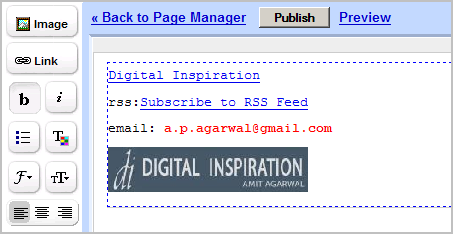
Step 2: Open a new Gmail compose message window. Now either drag the signature in this GMail window or press Ctrl+V to paste it.

The same technique can be applied to embed anything in your gmail message. Say you want to embed an image between two sentences, just drag the image to your gmail compose window and drop it there. It's that simple but makes you email more appealing as if it's composed inside Microsoft Word or Outlook.
To embed Feedburner RSS feed animator, open that graphic in your browser window and drag-n-drop it anywhere in your gmail message.
You can even point images to your blog or embed HTML forms so that recipients can subscribe to your blog directly from your gmail message. Or create tables in Microsoft word and place them in your email. Or even send entire webpages as email so readers can view the page in the message itself without having to click the link. The possibilities are endless.
Previous GMail Hacks:
» Fix GMail Login Issues
» Control size of your GMail Inbox
» Generate GMail Signature Graphics

 GMail has a wonderful rich text editor to compose emails but there are some desirable things that you cannot accomplish in GMail using standard techniques. For example:
1. GMail allows plain text signatures but there's no way to embed HTML signatures with images like the ones you see in Yahoo, Hotmail or Microsoft Outlook email.
2. Gmail Rich text editor has standard text formatting features like font sizes, colors, bullets, hyperlinks, indentation, etc. but there's no way to add other HTML tags like TABLE, DIV, EMBED, etc. So how do you embed Youtube videos, sophisticated table layouts, Flash animation movies, inline podcast players like odeo, etc. in GMail ?
3. You can compose new email in either Plain text or Rich text but how to do you compose a new GMail message in native HTML something like a webpage created in Microsoft Frontpage ?
4. Gmail lets you attach pictures to outgoing email but it shows up as an attachment on the recipients' screen. How do make embed a photograph that appears inline with the actual email message ?
5. You want to embed the Feedburner Headline Animator graphic or the Feedburner Subscriber Counter to your GMail signature which is an animated GIF file.
Now the really good news is that you can do all the above easily with GMail and here's how to do it:
To embed an HTML signature with Images in GMail ?
Create an HTML signature snippet using notepad or WYSIWYG editors like Dreamweaver/Frontpage/Golive or online with Geocities/GooglePages/Tripod Lycos. Your signature can have all kind of HTML tags (including DIV, EMBED, TABLE) but all linked Image files, audio files and video clips must be pointing somewhere the web and not on your desktop.
Once you are satisfied with the layout, select the entire portion of the webpage that you want to appear in the GMail signature and drag it to the GMail compose window. Alternatively you can copy it to the clipboard and then press Ctrl+V in the Gmail window.
I have an illustration here:
Step 1: The HTML signature is created in Google Page Creator. Select the entire signature and press ctrl+c.

Step 2: Open a new Gmail compose message window. Now either drag the signature in this GMail window or press Ctrl+V to paste it.

The same technique can be applied to embed anything in your gmail message. Say you want to embed an image between two sentences, just drag the image to your gmail compose window and drop it there. It's that simple but makes you email more appealing as if it's composed inside Microsoft Word or Outlook.
To embed Feedburner RSS feed animator, open that graphic in your browser window and drag-n-drop it anywhere in your gmail message.
You can even point images to your blog or embed HTML forms so that recipients can subscribe to your blog directly from your gmail message. Or create tables in Microsoft word and place them in your email. Or even send entire webpages as email so readers can view the page in the message itself without having to click the link. The possibilities are endless.
Previous GMail Hacks:
» Fix GMail Login Issues
» Control size of your GMail Inbox
» Generate GMail Signature Graphics