Convert PDF to HTML - Free Online Conversion

Convert PDF to WordHow to instantly convert Microsoft Office, OpenOffice, PDF documents to HTML without installing any third-party software like Adobe Acrobat or PDF2HTML. Extract Text from PDF documents. Convert doc, xls, ppt, rtf, pdf to HTML - Free Online Conversion that works on all platforms be it Windows PC, Mac or Linux.

We will utilize the recently announced See it now feature in GMail to convert Adobe PDF documents into html files. In addition to PDF, you can also convert all Microsoft Office Document formats (MS Word .doc, Excel .xls, Powerpoint .ppt, Rich Text Format .rtf), OpenOffice.org Document Formats (Writer, Calc, Impress, Presentation) and WML Files (Wireless markup language) to HTML. Here's how to get this done with GMail:

1. Compose a new message in GMail. (If you are still without a GMail account, request a GMail Invitation code)

2. Attach any PDF or Word document that you want to convert to HTML You can attach multiple files in this step by clicking Attach another File.

3. Enter your own email address in the To: box and click send.

4. You instantly receive a message in your GMail Inbox folder. Open the message and click the "View as HTML" link next to your attachment.

5. The contents of your attachment appear as HTML in a new browser window without having to download the file. When you're finished reading the attached file, close the new browser window to return to Gmail or Save the file to your harddrive.
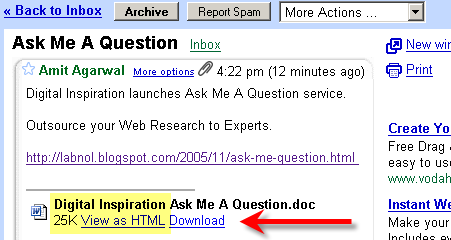
Convert PDF to HTML with GMail

GMail will show the following types of files as HTML: .pdf, .doc, .xls, .ppt, .rtf, .sxw, .sxc, .sxi, .sdw, .sdc, .sdd, and .wml. You can extend this trick to extract text from PDF documents (PDF to Txt) or Convert Adobe PDF documents to Word (PDF to Doc conversion). First convert the Document to HTML with Gmail and then open the HTML file in Microsoft Word and choose Save as .doc.

Convert PDF without Adobe Acrobat PDF writer - This has link to free or inexpensive PDF creation software. Or Read another Google approach to convert Microsoft Office and PDF files to HTML or Translate PDF and Office documents to different languages.

About GMail See it Now: You can view Microsoft Office, OpenOffice or .pdf attachments as a web page in HTML by clicking the "View as HTML" link right next to it. For when you're on a mobile device or you don't want to install some new software just to view a document. Or if you just want to see it faster.

If you are looking for a commercial PDF conversion software, we recommend ABBYY PDF Transformer that offers One-click conversion from PDF files to Word, Excel, HTML or text. It retains layout and format without retyping and reformatting.

Find this article at: http://labnol.blogspot.com/2005/12/convert-doc-xls-ppt-rtf-pdf-to-html.html

web: http://www.labnol.org/ email: amit@labnol.org

Reader Comments

You can also utilize GMail HTML to PDF conversion engine to convert DOC files to CHM. Save the DOC file as HTML and use the Microsoft HTML Help SDK to create the CHM file.

To convert PDF to JPG, simple convert PDF to HTML and then use Snagit's scroll capture feature to take a screenshot of the entire HTML webpage to any image format like jpg, bmp, png or tiff.

Adobe PDF Conversion by Email Attachment

How can I convert Adobe PDF files that are on my hard drive to text or HTML? There are three solutions for converting Adobe PDF documents on local media into other formats:

1. Submit the Adobe PDF as a MIME attachment in an e-mail message:

* For conversion to plain text, e- mail the PDF file to pdf2txt@adobe.com
* For conversion to HTML, e-mail the file to pdf2html@adobe.com

2. Use the free Adobe Reader to save the PDF file as text, or use the full version of Adobe Acrobat Professional or Acrobat Standard to save the file to text or other formats, including Rich Text Format (RTF), HTML, XML.

Convert your PDF files to HTML using the PDF to HTML converter and easily integrate resulting HTML files in your existing web site structure. Converting PDF documents to HTML makes their contents more accessible and available for a larger target audience. The Access conversion technology was developed to allow blind and visually impaired users to read Adobe PDF documents with speech synthesis software. For this reason, graphic elements are stripped from the file and text is reformatted during conversion.

There is one small caveat. Apparently, you _must_ have English (US) selected as display language in your gmail settings in order to get the option "View as HTML".

dude u are brilliant. what an idea.
i wasted like 3 hours looking for a free converter to convert a 26 page pdf.

really u have the brilliance that it takes to make a great blogger.

thank you for the help.
chirag1983@gmail.com

sweet but author protected though. Gmail is too honest for its own good

sweet but author protected though. Gmail is too honest for its own good

it won't work on a copy-protected pdf file

I made the pdf by scanning the original document. I wasn't able to extract any info via the html method in gmail method. I downloaded a free program that said it would convert. I got a photo image. I downloaded the professional Adobe Acrobat and got a photo image. So much for technology. This has taken hours that could have been used keyboarding in the original text. I even tried using open office. I can only hope half a day of failing can be of use to someone else who reads this. So much for technology. Am I bitter? I think so.

OpenOffice is a free application which can be used to convert all MS Office and OpenOffice file to PDF. I am not very sure about the reverse conversion, though.

Nice. I was also able to convert the document I was after by googling it then selecting 'view as HTML' which possibly uses the same engine. Of course, this only works if your doc comes up in google. But there do appear to be a fair number of free PDF to text converters around. Try searching 'pdf convert' in versiontracker.com

For copy-protected files, u can use www.zamzar.com

That is brilliant! I wish I could say that I had thought of such an obvious solution. Thank you! ;) JB

I'm not sure it's working any more.

To pdf2html@adobe.com ->

----- Transcript of session follows -----
... while talking to host-sjc0-61.ntbe.adobe.com.:
>>> DATA
<<< 550 5.7.1 Unable to relay for pdf2html@access-sjc0-1.ntbe.adobe.com
550 5.1.1 pdf2html@access-sjc0-1.ntbe.adobe.com... User unknown
<<< 554 5.5.2 No valid recipients

Good Thinking DUDE! :-)

*muah*

You need a print feature so I can print without the annoying google ads.

travbailey%%%%%%%%%yahoo%%%%%%com

I have tried, tried and tried again to use the GMAIL PDF to HTML conversion technique suggested but I cannot do it.

I can't find the See Now feature and no matter what I do I can't save it as HTML - I have tried once but when I try to open it, it comes up as a micro icon which I can't do anything with.

I have followed all the advice on the previous posts.....I have been trying to do this for 3 hrs now and am pretty frustrated!

Help!!

nice trick but still facing problem.. i have a secure pfd and i want to print that I can only read that with adobe reader

I tried this with gmail but I got htis message "The attachment cannot be viewed as HTML because the author has placed restrictions on its content. Download the attachment to view it in its original format."

is there any solution to print this article
http://www.bcs.org/upload/pdf/basample.pdf


thankz in advance

It's a good thing they aren't publicizing this "feature"!!! It works for text, but for anything with tables it fails miserably.

Very neat feature! However, does not convert graphics in the .pdf. Apart from that - brilliant!

Thanks so much !
Very useful feature.

« Back to main


Google Custom Search