 Autodesk will release Autodesk Revit Building 9 and Revit Structure in early 2006. Autodesk Revit Building 8, incorporating state-of-the-art building information modeling (BIM) capabilities that let architects and designers work together on a single holistic representation of a building project, to save time and money in the design process. Autodesk Revit Building 8.1 is a fully integrated geometrical, material, and analytical mod�eling application for structural engineering, analysis, design, and documentation. It is building information modeling (BIM) for structural engineers.
Autodesk will release Autodesk Revit Building 9 and Revit Structure in early 2006. Autodesk Revit Building 8, incorporating state-of-the-art building information modeling (BIM) capabilities that let architects and designers work together on a single holistic representation of a building project, to save time and money in the design process. Autodesk Revit Building 8.1 is a fully integrated geometrical, material, and analytical modÂ�eling application for structural engineering, analysis, design, and documentation. It is building information modeling (BIM) for structural engineers.The Autodesk Revit platform (Autodesk Revit Building 8.1 and Autocad Revit 9.0) is beginning to show some connection with Autodesk Architectural Desktop through the ability of Revit Structure to export and read Architectural Desktop structural objects. Revit Building 8.0 success the highly successful Autodesk Revit 7. The AutoCAD Revit Series 8 includes AutoCAD 2006 and Autodesk Revit Building 8. Autodesk Revit Building supports complete round-tripping of markups with Autodesk® DWF Composer. You can also publish Revit Building models to 3D Autodesk DWF (Design Web Format) file format for high-impact communication of 3D design information.
Autodesk Revit Building provides features that help integrate your work with consultants. The Autodesk VIZ 2005 Interoperability Plug-in for Revit Building lets you import DWG files produced in Autodesk Revit Building and use them to create stunning, photorealistic interior and exterior renderings. You can import or link DWG files directly into Autodesk Revit Building to use as reference geometry or as the starting point for a new design, such as a site plan. Any CAD system that supports the DWG, DGN, or DXF file format can work effectively with Autodesk Revit Building.
With Revit publish to Autodesk Buzzsaw, you can easily convert Autodesk Revit Building files to DWG or DWF format and upload them to Autodesk Buzzsaw project sites. Using default template assignments, you can also assign properties to a view and then set them back to their original state whenever you publish or print your project.
Autodesk is trying to remove cost from the equation by bundling AutoCAD 2006 with Revit 8 for the cost of AutoCAD alone. You must install both on the same system under the joint license arrangement. In order to site license Autodesk Revit Building 8, you must install the Network License Manager onto a server on your Local Area Network. Autodesk Revit Building 8 requires Network License Manager based on FlexLM version 10.1.5 and is not compatible with previous versions of the Network License Manager.
Download Autodesk Revit 7.0 (exe - 48.8 Mb) - Autodesk Revit Building 8 and 8.1 Documentation, Autodesk Revit Building 8 Help Files
Download Autodesk Revit Building 8 (exe - 68.0 Mb (Build Number: 20051017_2000) - Also contains link to Download Autodesk Revit Building 8 Content and Libraries, Download Autodesk Revit Building 8.1 Tutorials, (Metric & Imperial Format) - RevitBuilding8.1_20051017_2000.exe
Try Revit Building Online with Autodesk Revit 7 Streaming Trial - Try Revit 7 and Revit 6 by streaming Autodesk software at no cost. The trial is a fully functional version of Autodesk Revit - including the ability to create, view, save, and plot your own files. This trial is available only in the United States and Canada.
Autodesk Revit Building Related Books
* Autodesk Revit for Building Designers & Architects Release 7.0 by Sham Tickoo
* Mastering VIZ Render: A Resource for Autodesk ADT Users by Paul F. Aubin
* Mastering Autodesk Architectural Desktop by Paul F. Aubin
* Building Construction Illustrated, 3rd Edition by Francis D. K. Ching
* Mastering Autodesk Revit Building by Paul F. Aubin
Download Free Audesk Revit Training Videos in Windows Media Player format from dgcad,com. Revit City (revitycity,com) offers links to Revit Tutorials, Revit Families and other Revit Building Resources.
Autodesk Revit Building 8.1 is available only to Subscription Customers of Revit Building 8.0. With subscription, Autodesk Revit customers receive many benefits, including new releases and technology updates, predictable budgeting, e-Learning tools, and online support. This Web Download of Revit Building 8.1 and AutoCAD Revit Series 8.1 are applicable only to licenses of the English version of Revit Building 8. The Service Pack 1 for Autodesk Revit Series 8.0 requires the original installation CD of Revit Building 8.0, original CD of Revit Building 8.1 or the network image.
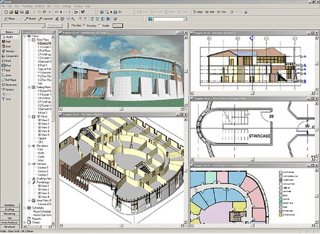
With Autodesk Revit Building, you get back to what you love: designing buildings, without your software getting in the way. Work in any view that makes sense, quickly and easily making changes to major design elements. Create comprehensive design proposals in record time. See your ideas visualized on the fly with 3D views and instant shadows. You can even make late-stage changes without worrying about coordinating your plans, schedules, and construction documents. You design it; Revit Building documents it.